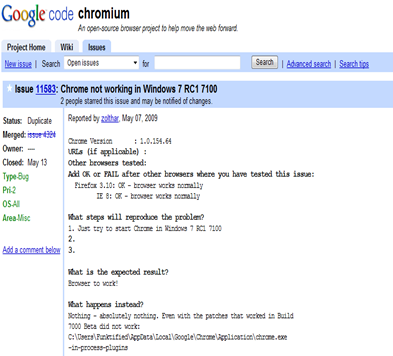
I was never a great fan of Google Chrome.As a heavy browser,I find Firefox as the best browser for me.Main reason being the plugins and Add-ons. Although IE8 is faster than FF consuming less memory,i still prefer FF over IE8 because IE 8 crashes more than bumping car..oh.. MS :( . Anyways, since Chrome caugh my attention recently ,I thought I would try it on Win7 The installation went fine and it even imported my bookmarks from IE8.but once I opened Chrome,it said “Aww Snap Chrome has crashed..”.I tried restarting,then opened in compatibility mode..still couldn't even open a single page. It looks like the problem is already noted as I found this issue reported in Chrome’s official website .(issue 11583). I also tried installing the latest beta version and the shortcut modification which appears to be the only solution available now,unfortunately both didn’t work. I don’t think i will try it again..I am happy with Firefox(3.1 beta 4) and will wait for FF 3.1 full release


Live Page Popularity

About Me

- Deekshith Marla
- Hyderabad, Andhra Pradesh, India
- I am a student doing computer science engineering. I fell in love with computers way back in 7th grade. I have nourished my passion for technology and thirst of learning well! I am an avid Internet addict, and love to read about Technology, Web 2.0, Design. On the personal side I love adventure and like living on the edge. I enjoy trekking, chatting and travelling.

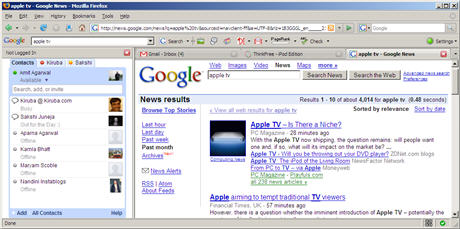
The Google Talk Gadget is clearly more usable than the stand-alone GTalk desktop client or the floating AJAX version in GMail.
Here, each chat session opens up as a tab (like Firefox browser tabs), it can show previews of images or video and the chat client can easily be embedded inside webpages.
There's however a small problem - while we have browser windows in front of us all the time, the same may not hold true for the webpage (like the Google personalized page) where we have embedded the GTalk gadget.
So here's an alternate option - put the Google Talk client in the Firefox sidebar so it always stays in the foreground no matter what website you are on currently.
To add Google Talk to your Firefox sidebar, bookmark the following URL (right-click and choose Bookmark this link)
talkgadget.google.com/talkgadget/client
Now goto Bookmarks menu, navigate to the above bookmark, right click and choose Properties. Tick the checkbox that says Load this bookmark in the sidebar.
Update: An employee of an investment bank writes that their organization has banned Google talk in office but using the above method, he was able to circumvent the GTalk ban and could chat with friend out the firewalls of his office.
Google Talk gadget will always open in the Firefox Sidebar.
Replace Windows Task Manager with Process Explorer
Posted by Deekshith Marla
There are times when you feel Windows Task Manager is not sufficient to track any particular troublesome process. It happens when suddenly your system starts to behave indifferently and you begin investigating the convicted process. You end up with one and only solution – reboot the system. But what if you in middle of something very important and suddenly your machine stops responding?
For these types of adverse situation and many more, Process Explorer comes into the picture as your savior. Process Manager is an advanced freeware process management utility that displays running processes in a tree structure that includes not only the process name but its icon, command-line, full image path, memory statistics, user account, security attributes and much more.
Its main window is subdivided into two panels – the first one displays the basic information like currently active processes names, account under which they are running etc. whereas the other one which is the bottom panel gives in depth information about process selected in the top window. The information displayed in bottom panel is based on the mode that has been configured in Process Explorer. If it is in HANDLE mode you’ll see the handles that the process selected in the top window has opened or if Process Explorer is in DLL mode you’ll see the DLLs and memory-mapped files that the process has loaded.
This is a very handy tool that can give you full information about any running processes and can be very useful if you want to track down any spywares in your system. But if you are not a technology geek then you may find the detailed information a bit difficult to comprehend. Nevertheless, anyone with an average knowledge of computer system can use this utility to their advantage.
Installation file is just 1.6 MB in size and you can Download it from HERE.
(It’s totally FREE to use)
Have you ever thought of editing the web pages of another website..!! This simple code makes it possible.

This is one of the ways scammers create fake screenshots, fake Adsense & affiliate earnings and even fake Paypal transactions.
All you need to do is visit the site you want to edit, paste the code below into your web browser address bar (tested in Firefox & IE7) and hit the Enter button.Then simply select a portion of text on the page and start editing.
CODE :
javascript:document.body.contentEditable='true'; document.designMode='on'; void 0
Website not opening !!, seems there server is crashed ..
Many times we came across such statements, there are possible few reasons why any website or server may crash.
Top and most possible reasons may be…
1. Digg/Slashdot - Got appearence on front page of Digg orSlashDot
2. Cable tripping - Someone who probably shouldn’t be walking around in a server room trips on a cable.
3. Coffee/Cola - Someone spills coffee or Jolt Cola on the web server, or, if things are really bad, beer.
4. Pure Enthusiasm - Your boss gets whiff of a new feature and says, “Just install it! What could possibly go wrong?”
5. DDoS attack - An angry, angst-ridden teenager launches a DDoS[Denial of service] attack on your website.
6. Web server upgrade - Your web host upgrades the web server. Nobody told you and now nothing works. This is strongly connected to point 4…
7. Police raid – It happened to The Pirate Bay/Demonoid etc…
8. Bandwidth - Your web host decides you have consumed enough bandwidth this month and cuts you off.
9. Burnout – Your web server decides to spontaneously combust.
10. Blame it on the weather - The next big hurricane hits the US East Coast where your servers are.
We all know that while surfing Internet we leave our information and whereabouts behind us in the form of IP addresses in the log files on the remote web servers of the sites that we visit. But did you know that this may unknowingly lead you into trouble? How? - Let’s quickly run through a list of scenarios wherein you might want to browse Internet in anonymous mode. The above mentioned scenarios are just few of the hundreds of reasons because of which you may want to surf the Internet as an anonymous user. Now let’s look at how do we become anonymous. Tor is a network of virtual tunnels that allows people and groups to improve their privacy and security on the Internet. Since it uses a distributed and anonymous network, no single point on Internet can link you to your destination. Instead of taking a direct route from source to destination, data packets on the Tor network take a random pathway through several servers that cover your tracks so no observer at any single point can tell where the data came from or where it’s going. You will have to download and install the Tor application bundle that will also install aTorbutton plugin for your Firefox browser (using Firefox browser is highly recommended). Post which you may configure your other applications that you want to protect and anonymize, that’s it. » [Download Tor] | [Documentation of Tor]Using Tor: anonymous internet software
Installing Tor on your system: Browsing anonymous